Dataset Discovery: Finding Public Datasets via Chat
Use natural language to find public datasets to benchmark or supplement your own logs.
Overview
When debugging your own agents and chatbots, it is often useful to compare against a public reference dataset, or to pull in domain-specific corpora to test prompts. Use the Hyperparam chat interface to search Hugging Face directly without leaving the workspace.
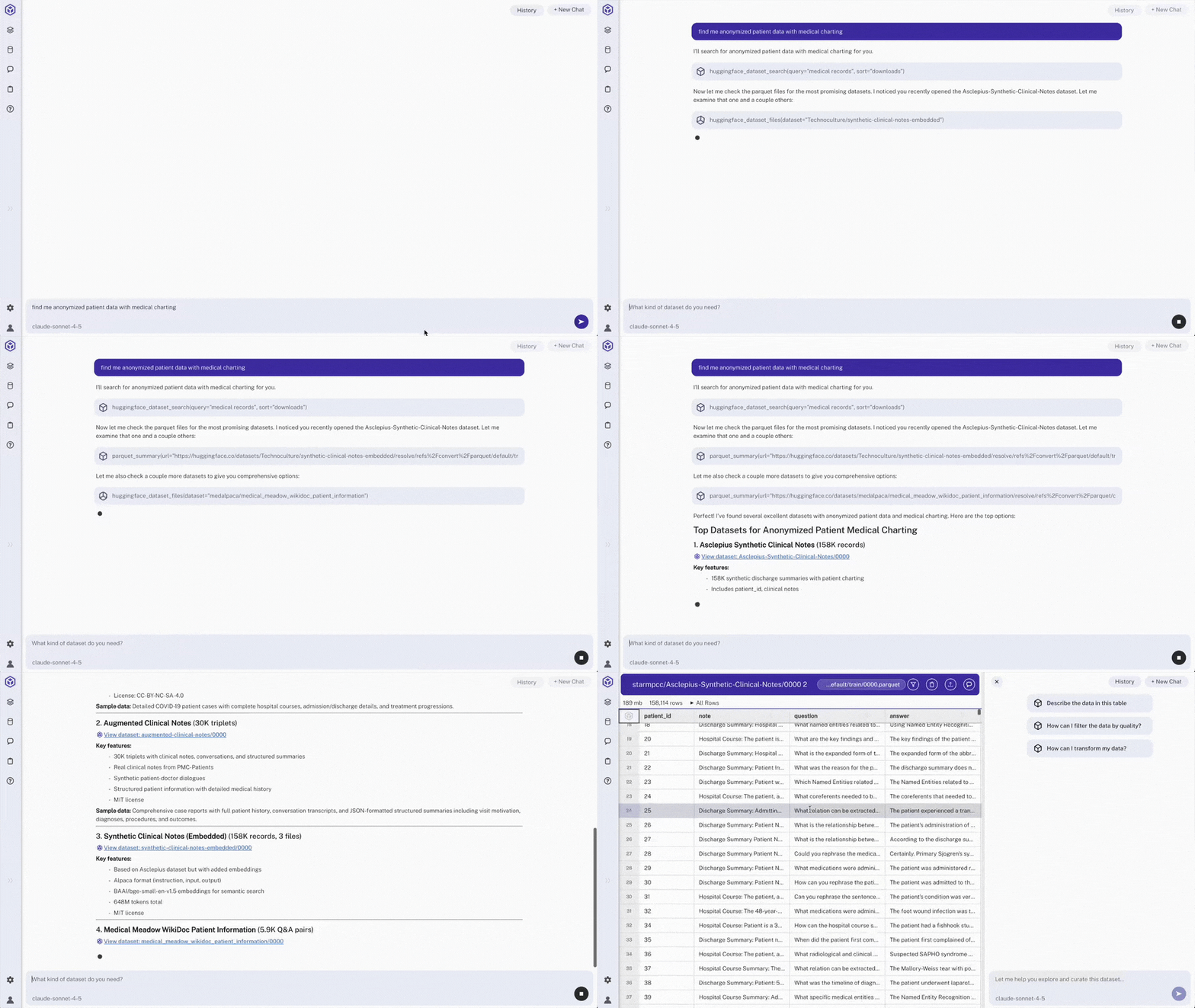
Steps
- Open Hyperparam Chat
Access the chat interface from the main navigation
- Search using natural language
Example query: "find me anonymized patient data with medical charting"
> Note: Hyperparam Chat will return data sets from Hugging Face that match criteria
- Open dataset from results
Click on a result (e.g.,
chunked-ehr/0000) to open in the data viewer> Note: Dataset loads with all columns and metadata
Expected Results
- Quick discovery: Natural language search returns relevant datasets
- Direct access: One-click opening into data viewer
- Context preserved: Chat understands domain-specific terminology (medical, ML, etc.)
Other Use Cases
- Classifying Prompt Patterns: Categorize unstructured prompts to see your real traffic mix
- Patient Data Workflow: Extract, filter, and export structured medical data
- Quality Filtering: Remove low-quality responses from chat logs
- Deep Research: Multi-step AI workflow for comparing model outputs